This walkthrough goes over moving Unifi access point to another Unifi controller. To remove APs from a Unifi Controller you need to reset the APs and then either discover them or manually SSH set-inform the devices.
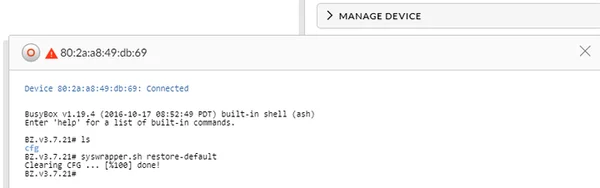
First Reset the AP
- Use Terminal or SSH (Either in existing Controller -> Manage Device -> Open Terminal or Putty)
- Type:
syswrapper.sh restore-default
OR - Reset the Unifi AP by the old paperclip method if you can’t putty or use existing controller
- Type:
Second discover device or manually set-inform
On the new controller try to discover the now factory reset APs and with any luck they will show up. However in big environments I typically can never get them to be discovered so I will show you the manual method.
Find the IP of the AP (You can easily grab this by looking at old controller OR using advanced IP Scanner. Note: match MAC address if scanning)
-
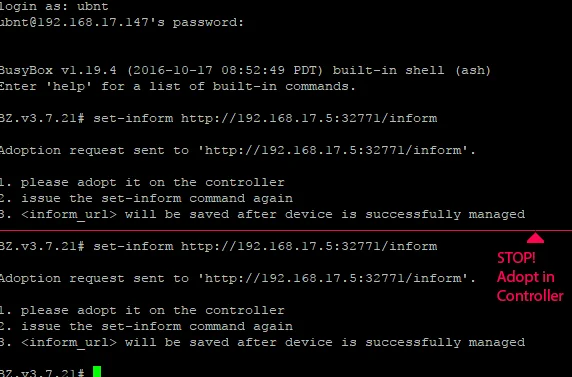
Putty into the AP (Launch Putty type IP, and Username/Password is factory ubnt/ubnt)
set-inform http://ip-of-controller:8080/inform
-
Adopt AP in new controller webpage
- Type AGAIN:
set-inform http://ip-of-controller:8080/inform
- Type AGAIN:
We are now done moving Unifi access point on to the new Controller, and as a result, will be in the device list. From here you will be able to manage it, upgrade firmware, and do all the configuration options needed.




Comments
Comments load when this section comes into view.