
Give the GRUB boot menu a complete visual overhaul with eight themes ranging from clean and minimal to retro games and hacker-inspired interfaces.
Quick install
This collection is for Linux systems that already use GRUB 2. You need Git, sudo access, and a working internet connection.
git clone https://github.com/christitustech/bootloader-themes
cd bootloader-themes
sudo ./install.sh
Choose a theme from the interactive menu, let the installer rebuild the GRUB configuration, and reboot to see it. You can rerun sudo ./install.sh whenever you want to switch themes.
The project and current installer are available at ChrisTitusTech/bootloader-themes.
The installer runs as root and changes bootloader configuration. Confirm that your system uses GRUB, review
install.sh, and keep bootable recovery media available before changing any boot configuration.
What the installer changes
The script does more than copy a background image. It:
- Creates an initial backup at
/etc/default/grub.bakif one does not already exist. - Copies the selected theme into
/boot/grub/themes/. - Sets
GRUB_TIMEOUT_STYLEtomenuand the timeout to 60 seconds. - Points
GRUB_THEMEat the selected theme and setsGRUB_GFXMODEtoauto. - Regenerates the GRUB configuration with the command available on your distribution.
The collection contains snapshots of community themes. Check each linked upstream project when you want the newest version or theme-specific customization options.
Included themes
| Theme | Style | Good choice when you want |
|---|---|---|
| CyberRe | Red and cyan futuristic HUD | A bold, high-contrast boot screen |
| Cyberpunk | Neon game-inspired interface | Colorful menus with operating-system icons |
| Fallout | Green retro terminal | A Pip-Boy-style boot experience |
| Vimix | Clean dark minimalism | A polished theme that stays out of the way |
| Shodan | Dark data-stream interface | A minimal hacker and terminal aesthetic |
| DedSec | Watch Dogs-inspired hacker UI | A detailed 1080p menu and broad icon support |
| Minegrub | Minecraft main menu | A playful, game-inspired boot screen |
| BSOL | Blue Screen of Life | A Windows blue-screen parody with modern fonts |
CyberRe
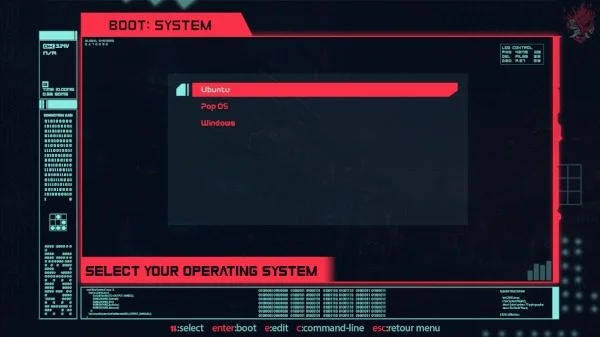
CyberRe frames the operating-system list inside a futuristic control panel. Its red highlights, cyan system details, and large selection area make it one of the most visually dramatic options in the collection.
Upstream theme: CyberRe on GNOME-Look
Cyberpunk
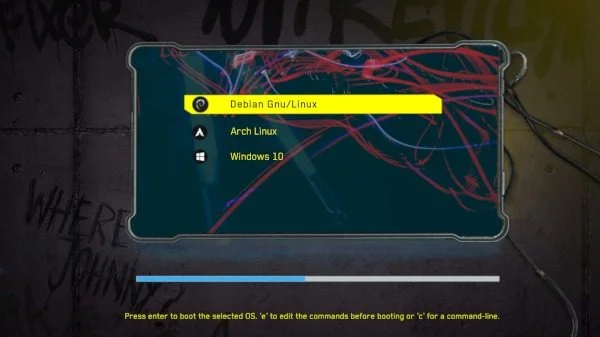
Cyberpunk uses a neon yellow selection bar, a blue menu frame, and game-inspired background art. The included icon set covers many Linux distributions as well as Windows, macOS, recovery tools, and other boot entries.
Upstream theme: Cyberpunk on GNOME-Look
Fallout
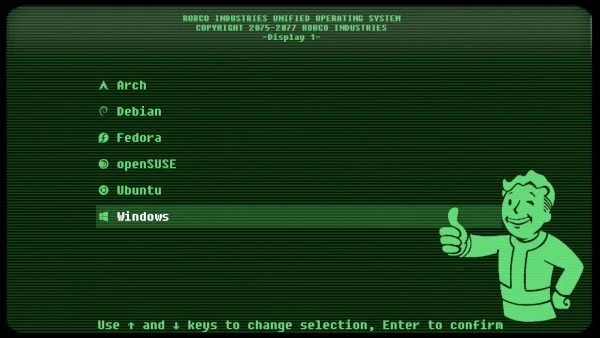
Fallout recreates the green monochrome look of a Vault-Tec terminal, complete with scan lines, a Vault Boy graphic, and distribution-specific icons. It is easy to read while still looking completely different from stock GRUB.
Upstream theme: Fallout on GNOME-Look
Vimix
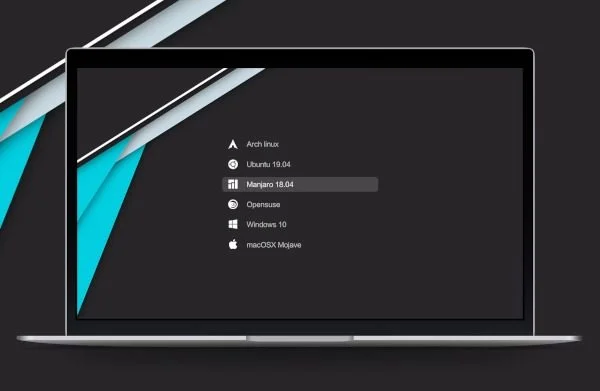
Vimix is the understated option. It combines a dark centered menu, subtle geometric artwork, and recognizable operating-system icons without making the boot screen feel busy.
Upstream theme: Vimix on GNOME-Look
Shodan
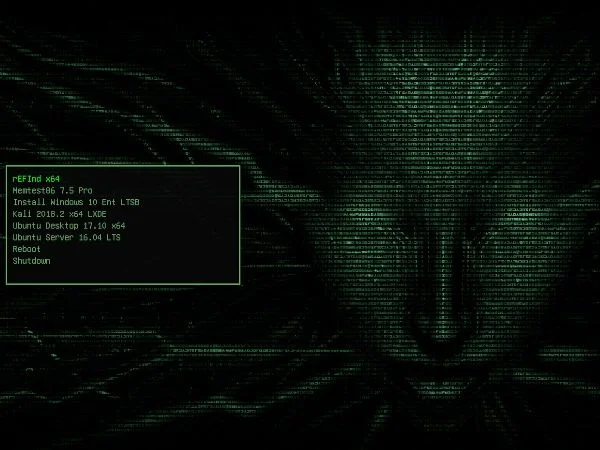
Shodan places a compact green terminal menu over a dark data-stream background. It works well for anyone who wants a Matrix-like or cybersecurity aesthetic with a simple text-focused menu.
Upstream theme: Shodan on GNOME-Look
DedSec
DedSec is inspired by the fictional hacker collective from the Watch Dogs games. The bundled 1080p layout includes a dark menu, custom fonts, a progress bar, and icons for a wide range of Linux distributions and boot tools.
Upstream theme: VandalByte/dedsec-grub2-theme
Minegrub
Minegrub recreates the Minecraft main menu with block textures, Minecraft-style fonts, splash text, and a “Joining world” boot countdown. The bundled layout is tuned for four boot entries; if its bottom bar overlaps your menu, adjust the documented position in the installed theme.txt file.
Upstream theme: Lxtharia/minegrub-theme
BSOL
BSOL stands for Blue Screen of Life. It turns the familiar Windows blue-screen visual language into a clean GRUB menu with Victor Mono fonts, a large countdown, and extensive operating-system icon coverage.
Upstream theme: harishnkr/bsol
Restore the previous GRUB configuration
If you need to undo the configuration changes, first confirm that the installer-created backup exists, then restore it:
sudo cp /etc/default/grub.bak /etc/default/grubRegenerate the boot configuration with the command for your distribution:
# Debian and Ubuntu
sudo update-grub

# Arch and distributions using /boot/grub
sudo grub-mkconfig -o /boot/grub/grub.cfg

# Fedora, openSUSE, and distributions using /boot/grub2
sudo grub2-mkconfig -o /boot/grub2/grub.cfg
Reboot after the command completes successfully. If your distribution stores grub.cfg somewhere else, use its documented path instead of guessing.

Comments
Comments load when this section comes into view.