
This program is free and open source, while being absolutely a life saver. I use it for VNC sessions and when dealing with VMs through my host computer.
View post by @christitustech on X
GitHub Link: https://github.com/Collective-Software/ClickPaste
Install
Simply extract the zip file from https://github.com/Collective-Software/ClickPaste/releases and run ClickPaste.exe
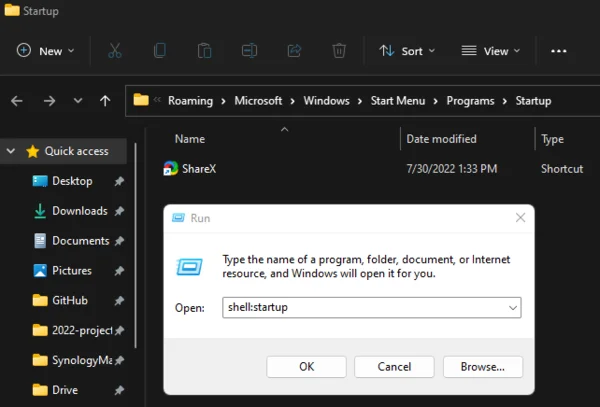
Running at Startup
The best way I’ve found is to create a shortcut to ClickPaste.exe then drag&drop that into shell:startup
Usage
First of course, you need to have some text in your clipboard. Then:
- Click the target notification icon to begin:

- Click to choose a location you want to paste the text:

- Your clipboard contents should be typed as keystrokes onto the window you selected:




Comments
Comments load when this section comes into view.