My AI Development Workflow
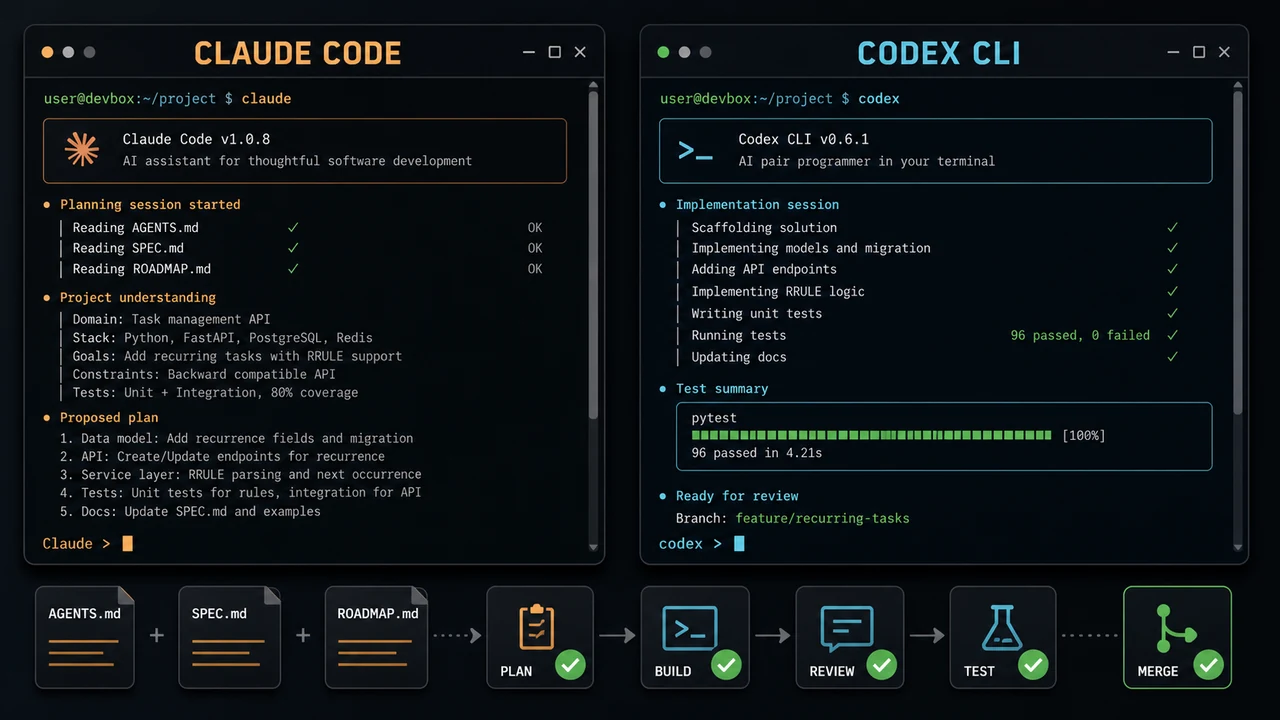
My AI workflow is not “write one giant prompt and hope the application works.” The coding agent is only one part of the process. Most of the reliability comes from defining the project, breaking it into phases, reviewing every change, and refusing to merge until the software has been tested by a human.
I use Codex or Claude Code to plan and build, CodeRabbit for another review pass, GitHub pull requests for the final discussion, and Git as the safety net around everything. The tools can change, but the workflow stays almost the same.
The complete loop looks like this:
Install titus-ai once
-> global Codex instructions and reusable skills
-> Idea
-> AGENTS.md
-> SPEC.md
-> ROADMAP.md
-> implementation plan
-> build with Codex or Claude Code
-> automated tests and local validation
-> local CodeRabbit review
-> pull request
-> CI unit tests, production build, and security checks
-> independent review and CodeRabbit review
-> fix, test, and resolve feedback
-> repeat until clean
-> complete manual testing
-> merge
This process can take hours, days, or longer. That is fine. AI makes writing code faster, but it does not make review, testing, or judgment optional.
Install Titus AI Before the First Project
Before I start the first project with Codex or Claude Code, I install my titus-ai repository. This is a one-time, user-wide setup that gives Codex the same global instructions, rules, configuration, and reusable skills in every project.
On Linux or macOS, I clone the repository, preview the installation, and then apply it:
mkdir -p "$HOME/github"
git clone https://github.com/ChrisTitusTech/titus-ai.git "$HOME/github/titus-ai"
cd "$HOME/github/titus-ai"
./scripts/install.sh --dry-run
./scripts/install.sh
./scripts/validate.sh
On Windows, I run the PowerShell installer from the cloned repository:
.\scripts\install.ps1 -DryRun
.\scripts\install.ps1
I run the dry-run first because the installer manages files in my existing Codex setup. When applied, it links the repository’s managed global AGENTS.md, Codex configuration, rules, local-model profiles, and skills into ~/.codex/ and ~/.agents/. Existing managed files are backed up under ~/.codex/backups/, while credentials, sessions, history, caches, and plugins are left alone.
This is user-wide rather than a root-level installation, so it does not need sudo. After installation, I restart Codex and ask it to list the instruction sources and relevant skills active for the repository.
The expected instruction order is:
- the global
~/.codex/AGENTS.mdinstalled bytitus-ai - the current repository’s root
AGENTS.md - any closer nested
AGENTS.mdorAGENTS.override.md
The global file provides a safe and consistent baseline, but it does not replace project documentation. Every project still needs its own AGENTS.md with the real architecture, commands, boundaries, and validation steps. When I use Claude Code, I explicitly tell it to read and follow that same project AGENTS.md before planning or changing code.
To update the shared setup later, I pull the repository and rerun the installer:
git -C "$HOME/github/titus-ai" pull --ff-only
"$HOME/github/titus-ai/scripts/install.sh" --dry-run
"$HOME/github/titus-ai/scripts/install.sh"
This gives every new project a consistent foundation before an AI agent sees the first implementation prompt.
Start With the Repository, Not the Prompt
Before asking an agent to change anything, I inspect the project that actually exists. I want to know:
- what branch I am on
- whether the worktree already contains changes
- how the project is built and tested
- which files define the architecture
- where the important runtime paths live
- what must not be changed
This prevents the agent from treating an established project like a blank canvas. It also protects unrelated work that may already be in the repository.
For a new project, this is when I establish the directory structure, source control, and basic validation commands. For an existing project, I make the agent read the repository before it proposes a solution.
Fill Out AGENTS.md
The repository’s AGENTS.md is the project-specific operating manual for coding agents. It extends the global baseline installed by titus-ai with durable instructions that should apply to every task in that repository.
Mine normally covers:
- the purpose of the project
- the important directories and files
- the approved toolchain
- build, lint, and test commands
- coding and content conventions
- security and privacy boundaries
- generated files that should not be edited
- actions that require human approval
- the validation required before work is complete
An instruction such as “follow best practices” is too vague. The useful version names the exact command, file, or boundary:
## Validation
- Run the unit test suite after application changes.
- Run the production build before declaring the task complete.
- Do not edit generated output as source.
- Never print credentials or commit environment files.
- Preserve unrelated changes in a dirty worktree.
This file should describe how work is done, not what one feature should do. Feature requirements belong in the specification.
Fill Out SPEC.md
SPEC.md defines what I am building and what “done” means. This is where a vague idea becomes a project that an agent can reason about.
At minimum, I define:
- the problem
- the intended users
- the required behavior
- the user experience
- the architecture and major components
- data flow and storage
- external services and interfaces
- security and privacy requirements
- performance and accessibility requirements
- non-goals
- acceptance criteria
- unresolved questions
The non-goals are important. AI agents naturally expand scope because they can see adjacent improvements. Writing down what the project will not do keeps a focused feature from turning into an accidental rewrite.
Acceptance criteria should be observable. “The page should be fast” is weak. “The page loads without client-side errors, remains usable at mobile widths, and passes the project’s performance budget” gives the builder and reviewer something they can verify.
If an important architectural question is still open, I resolve it before implementation. I would rather spend another hour on the specification than spend two days removing code built on the wrong assumption.
Fill Out ROADMAP.md
ROADMAP.md turns the specification into an ordered series of outcomes. It is not a wish list and it is not a dump of every possible feature.
Each phase should contain:
- the outcome
- the work included
- dependencies
- risks
- exit criteria
- the validation required to move forward
A simple roadmap might look like this:
## Phase 1: Foundation
- Establish the data model and application shell.
- Add the build, lint, and test gates.
- Exit when the application builds and the core test harness passes.
## Phase 2: Core Workflow
- Implement the primary user journey.
- Add error handling and focused tests.
- Exit when every acceptance criterion for the core workflow is verified.
## Phase 3: Release Readiness
- Complete accessibility, security, and performance checks.
- Test deployment and rollback behavior.
- Exit after independent review and documented manual testing.
For larger projects, I also keep a TASKS.md file with the small, executable tasks for the current phase. The specification defines the destination, the roadmap defines the order, and the task list tracks the immediate work.
These documents must stay current. If implementation reveals a better design or a requirement changes, I update the documentation instead of letting the code and plan silently drift apart.
Plan Before Building
Once the project files are filled out, I ask Codex or Claude Code to inspect the repository and produce an implementation plan. I do not start by asking for code.
The plan should:
- reference the relevant requirements and acceptance criteria
- identify the files and components likely to change
- separate the work into reviewable steps
- call out migrations, security concerns, and destructive actions
- define automated and manual validation
- list assumptions or unanswered questions
I read the plan before approving implementation. If it changes the architecture, skips a requirement, or touches more of the repository than necessary, I correct it at this stage.
A good plan gives the agent checkpoints. It also gives me a way to notice when the work has gone off course.
Build With Codex or Claude Code
I create a focused branch and let Codex or Claude Code implement one phase or task at a time. I tell the agent to follow AGENTS.md, the specification, the roadmap, and the approved plan.
During implementation, I expect the agent to:
- inspect existing patterns before adding new ones
- keep the change focused
- run relevant tests as it works
- stop when a requirement or destructive action needs a human decision
- explain meaningful tradeoffs
- inspect the final diff
- report exactly what was and was not validated
I check git status and git diff throughout the process. Fast generation makes it easy for an agent to touch twenty files when three would have been enough. Small checkpoints make mistakes easier to understand and revert.
I also keep commits focused. A commit should represent one understandable piece of work, not a bag of unrelated cleanup generated during the same session.
Run the Project’s Local Gates
The agent’s claim that a task is complete is not evidence. The repository’s tests, linters, builds, type checks, and validation scripts are the evidence.
The exact commands belong in AGENTS.md. Depending on the project, the local gate might include:
git diff --check
# Run the project's formatter or formatting check.
# Run its linter and type checker.
# Run focused tests, then the full test suite.
# Build the production artifact.
I start with focused tests while developing, then run the broader suite before opening the pull request. If any check cannot run locally, I document why and identify where it will run.
Run a Local CodeRabbit Review
Before I create the pull request, I use the CodeRabbit CLI to review the uncommitted changes:
coderabbit review --agent --uncommitted --include-untracked
The --include-untracked flag matters when the change adds brand-new files that have not been staged. Without it, those files can be missing from the review. This review can take time, so I let it finish. I do not cancel it because it has been quiet for a few minutes.
Then I triage every finding:
- If it found a real defect, I fix the defect and add or improve a test when practical.
- If it exposed an unclear design, I revisit the specification or implementation.
- If it is a false positive, I verify that conclusion instead of blindly changing working code.
- If it suggests unrelated cleanup, I keep that work out of the current change.
After making fixes, I rerun the relevant tests and run the local review again. I repeat this loop until the review is clean or every remaining item has a clear, defensible reason not to change.
AI reviewing AI is not proof of correctness. It is another set of eyes that is very good at finding missed edge cases, inconsistent patterns, and boring mistakes.
Create the Pull Request
Once the local gates and local review pass, I commit the focused change, push the branch, and open a pull request.
The pull request should explain:
- the problem being solved
- the approach taken
- important design decisions
- the exact automated checks that passed
- the manual tests already completed
- screenshots or recordings for visible changes
- known limitations or follow-up work
I usually keep the pull request in draft while checks are still running or while I know more testing is required. A pull request is not ready just because the code was pushed.
Establish Security Checks in the Initial PR
The initial project pull request also establishes the security baseline. I set up CodeQL, Dependabot, and dependency review before treating the repository as ready for normal feature work.
CodeQL code scanning analyzes supported languages for security problems in the source code. I configure it to scan pull requests and the default or protected branches, then make the result a required check. The language and build configuration must match the real project, especially when CodeQL needs to compile the code before analysis.
Dependabot version updates are configured in .github/dependabot.yml for every package ecosystem in the repository. I also include GitHub Actions so the actions used by CI do not quietly fall behind. Once the configuration reaches the default branch, Dependabot checks on the chosen schedule and opens pull requests for newer versions.
In the repository settings, I enable the dependency graph, Dependabot alerts, and Dependabot security updates. Security updates create focused pull requests when GitHub knows about a vulnerable dependency and a patched version is available.
Dependabot update pull requests are not the same as a blocking pull request check. For that immediate gate, I add GitHub’s dependency review action to the pull_request workflow and configure it to fail on high severity. That blocks both high- and critical-severity vulnerabilities introduced by a dependency change.
The initial security baseline is not complete until:
- CodeQL completes successfully for every supported project language.
- Every package ecosystem and GitHub Actions are covered by Dependabot.
- Dependencies are updated to current supported versions where compatible.
- There are no unresolved high- or critical-severity CodeQL or Dependabot alerts.
- Dependency review passes and is configured as a required pull request check.
- Any accepted exception has a documented reason, owner, and review date.
Dependabot keeps updates visible, but it does not prove that every new version is safe or compatible. Each update still goes through the unit tests, production build, review, and manual testing required for any other pull request.
Require a Pull Request Build
Creating the pull request must automatically trigger a CI workflow. That workflow runs again after every new push so the status always represents the latest commit, not an earlier version of the branch.
The exact jobs depend on the project, but the required gate should include:
- a clean checkout on a fresh runner
- installation from the project’s locked dependencies
- linting and type checks when applicable
- the complete unit test suite
- the production build or packaged artifact
pull request opened or updated
-> clean environment
-> install dependencies
-> run unit tests
-> create production build
-> report a required status check
The unit tests protect known behavior from regressions. The production build verifies that the project can still produce the thing that will actually be released. Running both in a clean CI environment also catches missing files, undeclared dependencies, and machine-specific assumptions that can be hidden on a developer’s workstation.
This check should be required by the repository’s merge rules. A failed or missing PR build blocks the merge. If a code path matters enough to protect, its regression test should live in the repository and run in this workflow.
Wait for Independent Review
The next step is deliberately slow: I wait.
I want both the repository’s CodeRabbit review and an independent review to finish. The independent reviewer can be another experienced person or a separate review agent with fresh context. It should not simply be the same coding session congratulating itself.
A fresh reviewer can challenge the assumptions shared by the builder and the original plan. I want that reviewer to inspect the actual diff, compare it with the specification, and look for missing tests, security problems, confusing behavior, and unnecessary complexity.
I do not merge while a required reviewer is still working. A green build does not replace review, and silence does not mean approval.
Address and Resolve Every Issue
When review feedback arrives, I handle each item individually.
For a valid issue, I:
- reproduce or understand the failure
- fix the root cause
- add a regression test when practical
- rerun focused validation
- rerun the broader required gates
- push the update
- reply with what changed
- resolve the thread only after the fix is present
For a false positive or an intentional tradeoff, I explain the reasoning in the thread. I do not make a bad change just to satisfy a bot, but I also do not dismiss feedback because it came from a bot.
Every new push can create new problems, so the process loops:
review feedback
-> fix or explain
-> automated tests
-> local CodeRabbit review
-> push
-> remote checks and reviews
-> resolve completed threads
-> repeat
I continue until required checks pass, actionable feedback is fixed, review threads are resolved, and the pull request is clean to merge.
Manual Testing Is a Hard Gate
Automated tests prove only what they were written to test. Manual testing is mandatory before I merge.
The checklist depends on the project, but I normally verify:
- the primary user workflow from start to finish
- error, empty, loading, and recovery states
- keyboard and accessibility behavior
- mobile and desktop layouts
- authentication and permission boundaries
- persistence across reloads or restarts
- logs and browser consoles for hidden errors
- upgrade, migration, and rollback behavior when applicable
- the real production build or deployment preview
I test on the actual target environment whenever practical. A mock can validate logic, but it cannot prove that a desktop integration, browser workflow, container deployment, or hardware-dependent feature works in the real world.
If I cannot complete a required manual test, the pull request does not merge. I document the missing validation and wait until the environment, hardware, account, or reviewer needed for the test is available.
My Final Merge Gate
Before merging, I confirm all of the following:
AGENTS.md,SPEC.md, andROADMAP.mdreflect the finished project.- The implementation matches the approved plan or documents why it changed.
- The diff contains no unrelated work, secrets, debug code, or generated junk.
- The required PR unit tests and production build pass on the latest commit.
- CodeQL and dependency review pass on the latest commit.
- Dependabot covers every package ecosystem and there are no unresolved high- or critical-severity alerts.
- The local CodeRabbit review is clean.
- The pull request’s CodeRabbit review is complete.
- Independent review is complete.
- Every actionable review thread is resolved.
- Manual testing is complete and documented.
- The branch is current enough to merge safely.
Only then do I merge.
Slow Is Smooth, and Smooth Is Fast
AI can produce code faster than I can review it. That is exactly why the workflow needs hard gates.
The planning documents reduce ambiguity. Small implementation steps reduce blast radius. Local review catches mistakes before they become public discussion. Pull requests create an auditable record. Independent review challenges shared assumptions. Manual testing proves that the real experience works.
Sometimes this process takes a long time. Reviews have to finish, a fix creates another edge case, or the real environment behaves differently from the test harness. That delay is not wasted time. It is the work required to turn generated code into software I am willing to maintain.
My rule is simple: AI can accelerate every stage, but it does not get to skip one.