
GitHub Copilot is a terrible name for this app. Microsoft has put the Copilot name on everything, but this is much more useful as a GitHub desktop dashboard for Linux, macOS, and Windows.
I use it to organize repositories, issues, pull requests, and notifications. I do not use the built-in Copilot subscription. Instead, I connect the app to my existing Codex subscription through CLIProxyAPI.
The GitHub App I Actually Wanted
The app’s My work view puts review requests, issues, pull requests, and repository activity in one place. That matters when your notification feed is constantly moving and older projects are easy to forget.
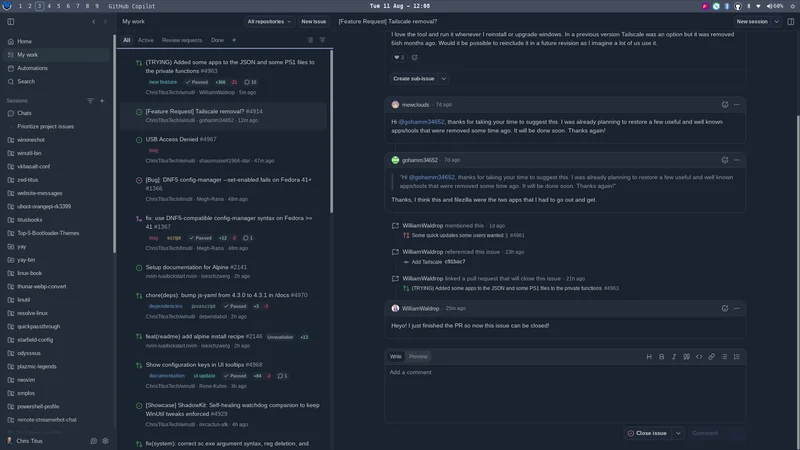
My normal workflow looks like this:
- Open My work and scan new activity across every connected repository.
- Open an issue or pull request in the app to get the context.
- Ask for a plan or initial scaffolding when an issue needs code.
- Continue the detailed implementation in my preferred editor or terminal.
- Review, close, or archive the item when the work is done.
I do not want the app to replace my IDE. It is the front door to the work: a fast way to decide what needs attention before I move into Codex, HerdR, or another development environment.
Prioritize Issues Across Every Repository
The biggest win is triage. GitHub’s normal notification stream tells you what happened, but it does not necessarily tell you what matters most.
I can ask the app to prioritize my outstanding issues and pull requests. If several users report the same WinUtil problem, that cluster should rank above a one-off request with little impact. A useful prompt is:
Prioritize my outstanding issues and pull requests across all connected
repositories. Group duplicate or closely related reports, rank them by user
impact and urgency, and explain why each item deserves its position.
The result is a practical queue instead of an endless inbox.
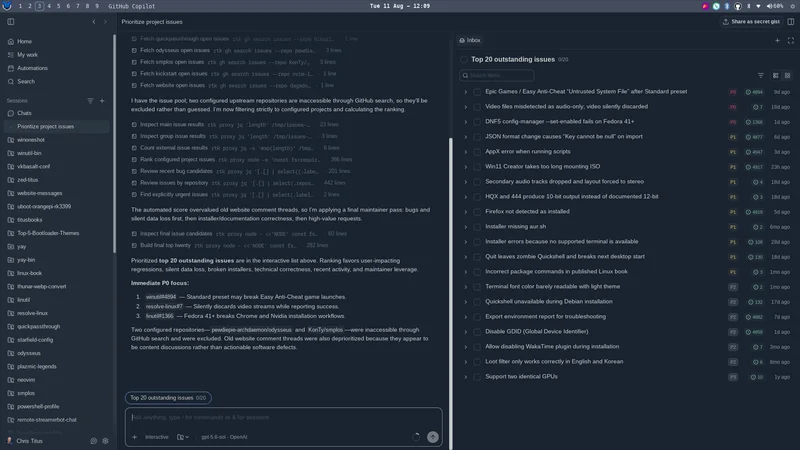
AI can miss context, so I still review the source issue before acting. The ranking is a starting point, not an automatic decision-maker.
Add and Synchronize Existing Repositories
Adding a large collection of repositories one at a time is tedious. I pointed the app at my working directory and asked it to identify local GitHub projects that were not already configured.
Once the repositories are available, the app can help spot stale clones, dirty worktrees, and branches that need attention. That is useful when I commit on one machine and later discover that another workstation has not pulled the change.
Never ask an agent to discard or overwrite local changes automatically. Have it report the repository state first, then review each proposed pull, commit, or cleanup action.
Replace the Copilot Provider with Codex
The app supports additional model providers. I use that capability to avoid buying another AI subscription for another application.
The path is:
GitHub Copilot app -> CLIProxyAPI on localhost -> OpenAI CodexCLIProxyAPI is a third-party open-source project that signs in to supported AI services and exposes an OpenAI-compatible local endpoint. If your ChatGPT plan includes Codex, it can route the app through that existing access instead of a separately billed OpenAI Platform API key.
This is not an official GitHub or OpenAI integration. Review the project before installing it, keep it updated, and expect your normal subscription limits and terms to apply.
Install CLIProxyAPI on Linux
The CLIProxyAPI documentation recommends a community-maintained Linux installer. Download it first so you can inspect it before running it:
installer="$(mktemp)"
curl -fsSL \
  https://raw.githubusercontent.com/router-for-me/cliproxyapi-installer/refs/heads/master/cliproxyapi-installer \
  -o "$installer" || { rm -f "$installer"; exit 1; }

less "$installer"
bash "$installer"
rm -f "$installer"
The installer normally places the binary and configuration under ~/cliproxyapi/. It also creates a cliproxyapi.service user unit and generates a local API key.
Open ~/cliproxyapi/config.yaml and verify that the service is bound only to localhost:
host: "127.0.0.1"
port: 8317
auth-dir: "~/.cli-proxy-api"

api-keys:
  - "sk-replace-this-with-a-long-random-local-key"
Edit the existing values instead of replacing the entire configuration. If the installer already generated a strong local key, keep it. Protect the configuration with:
install -d -m 700 "$HOME/.cli-proxy-api"
chmod 700 "$HOME/cliproxyapi" "$HOME/.cli-proxy-api"
chmod 600 "$HOME/cliproxyapi/config.yaml"
Sign In to Codex and Start the Service
Run the one-time OAuth login as your normal desktop user:
cd "$HOME/cliproxyapi"
./cli-proxy-api --codex-login
For a headless machine, use the device-code flow instead of the browser callback:
./cli-proxy-api --codex-device-loginAfter signing in, restrict the saved OAuth credentials to your user:
find "$HOME/.cli-proxy-api" -type d -exec chmod 700 {} +
find "$HOME/.cli-proxy-api" -type f -exec chmod 600 {} +
Then enable the user service:
systemctl --user daemon-reload
systemctl --user enable --now cliproxyapi.service
systemctl --user status cliproxyapi.service
A desktop user service starts when you log in, which is normally all this setup needs.
Test the Local Endpoint
Before changing the GitHub app, confirm that the proxy is running and that its local key works:
read -rsp 'CLIProxyAPI key: ' CLIPROXY_API_KEY
printf '\n'
curl -fsS \
  -H "Authorization: Bearer ${CLIPROXY_API_KEY}" \
  http://127.0.0.1:8317/v1/models
unset CLIPROXY_API_KEY
A JSON model list confirms that the service is reachable, the key matches, and the Codex login was loaded.
Connect the GitHub Copilot App
In the GitHub Copilot app:
- Open Settings.
- Select Model providers.
- Choose Add provider, then OpenAI.
- Set the base URL to
http://127.0.0.1:8317/v1. - Paste the local key from
config.yaml. - Save the provider and select one of the Codex models it exposes.
Start with a disposable repository and a small test prompt. Confirm the diff and commands before trusting the setup with important work.
Troubleshooting
Check the service and recent logs with:
systemctl --user status cliproxyapi.service
journalctl --user -u cliproxyapi.service -n 100 --no-pager
If the app cannot connect, verify that the base URL includes /v1, the port is 8317, and the service is listening on 127.0.0.1.
For a 401 response, make sure the key entered in the app exactly matches a value under api-keys in config.yaml. After changing the configuration, restart the service:
systemctl --user restart cliproxyapi.serviceIf no Codex models appear, repeat the OAuth login and test /v1/models from the terminal before changing more app settings.
Faster GitHub Actions with Blacksmith
The video also shows Blacksmith, the sponsor for this walkthrough. Replacing the standard GitHub-hosted runners and enabling Blacksmith’s cache cut one WinOnOneShot workflow from roughly five minutes to about two minutes in my test.
That result is from one project, not a promise for every workflow, but it is worth testing if CI wait time is slowing down your development loop.
Final Thoughts
The GitHub Copilot app is useful once I stop treating it as Copilot. It gives me one dashboard for repository activity, issue triage, pull requests, and local projects across Linux, macOS, and Windows.
Routing its AI features through CLIProxyAPI lets me use the Codex subscription I already have, while the app remains valuable even without AI as a GitHub organization and notification tool. For developers managing dozens of repositories, that organization is the real feature.
Sources
- GitHub Copilot app overview
- GitHub Copilot app model providers
- OpenAI Codex with a ChatGPT plan
- CLIProxyAPI project
- CLIProxyAPI Linux quick start
Video Walkthrough
The video shows my complete workflow, from replacing the built-in AI provider to triaging issues across roughly 100 repositories.
Watch the video directly on YouTube if the embed does not load.


Comments
Comments load when this section comes into view.